> ## Documentation Index
> Fetch the complete documentation index at: https://docs.supermisson.fun/llms.txt
> Use this file to discover all available pages before exploring further.
# Oracle Agent
> Your AI trading assistant. Search, analyze, and execute trades — all through conversation.
# Trade by talking
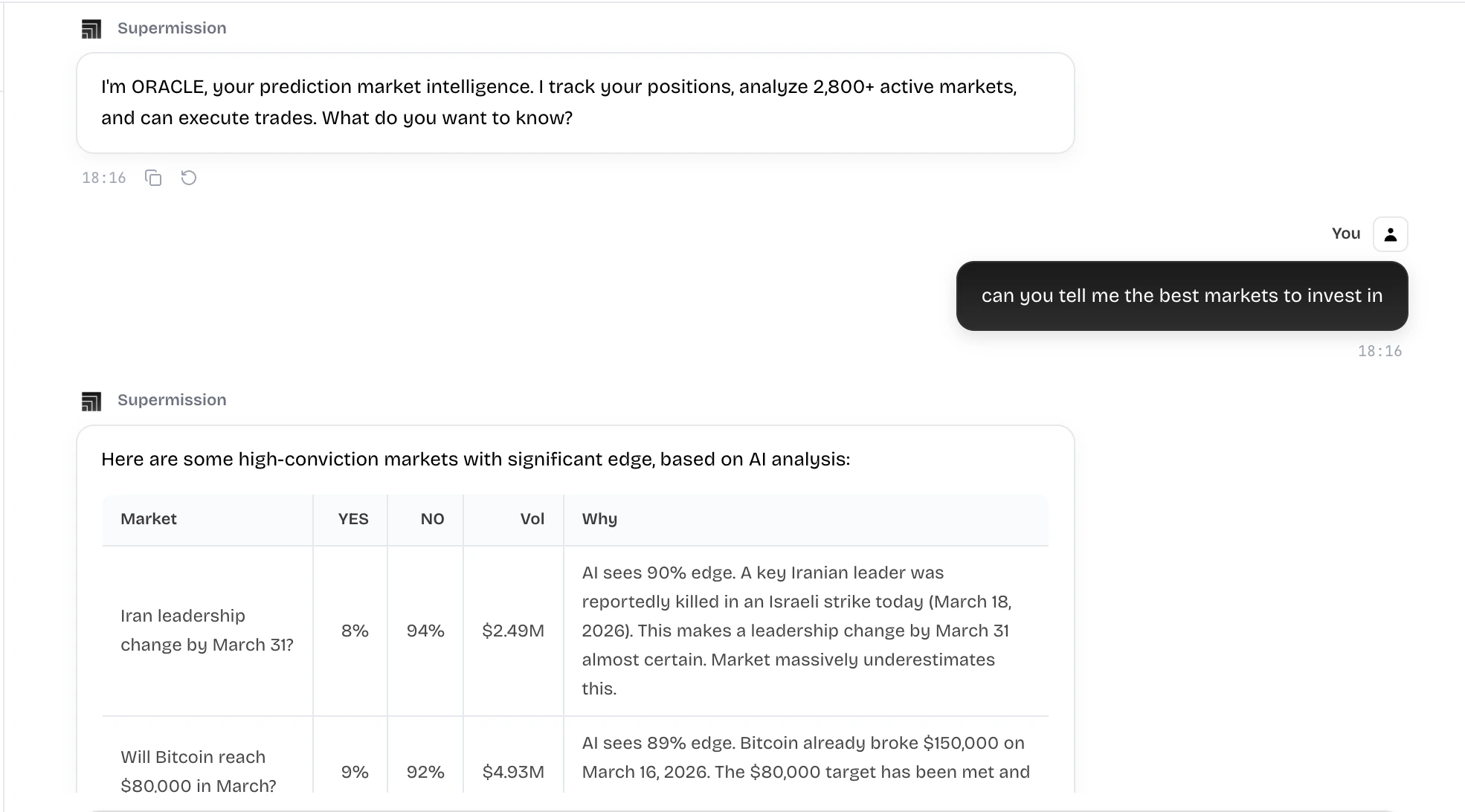 Oracle is a chat-based AI agent that can do everything the UI does — and some things it can't. Search markets, analyze positions, place trades, sell positions, and research topics. All through natural language.
Think of it as your junior analyst who also has a brokerage account.
## What Oracle can do
"What markets are there about the Fed?" — Oracle searches and returns relevant markets with current prices.
"How's my portfolio doing?" — Oracle pulls your positions, calculates P\&L, and gives you the summary.
"Buy `$25` on YES for Bitcoin above 100k" — Oracle confirms the details and executes the trade.
"Sell my Trump position" or "sell all my losing positions" — Oracle handles the execution.
## Example conversations
**You:** "Buy `$50` on NO for the recession market"
**Oracle:** Found "Will the US enter a recession in 2026?" — NO is currently at `$0.62`. `$50` would get you \~80 shares. Confirm?
**You:** "Yes"
**Oracle:** Done. Bought 80.6 NO shares at `$0.62`. Position is live in your portfolio.
**You:** "What are my biggest losers?"
**Oracle:** You have 3 positions in the red:
1. Fed rate cut June — down 23% (`$11.50` loss)
2. Bitcoin above 150k by March — down 45% (`$22.50` loss)
3. Trump executive order on crypto — down 8% (`$4.00` loss)
Want me to close any of these?
**You:** "What's the market saying about the next Fed meeting?"
**Oracle:** There are 4 active markets on the Fed. The consensus is pricing a hold at 72%. Our AI signal has a Sentiment divergence — we estimate 65% chance of hold, suggesting the cut is slightly underpriced. Want me to pull up the War Room analysis?
## How to trade via chat
The format is flexible. Oracle understands all of these:
* "Buy `$25` on YES for the Bitcoin market"
* "Put `$100` on NO for recession"
* "I want 50 shares of YES on the Fed market"
* "Sell my position in the election market"
* "Close everything that's down more than 20%"
Oracle always confirms before executing a trade. You'll see the market name, current price, share count, and total cost before any USDC leaves your wallet. No surprises.
## Position management
Oracle isn't just for entries. It's your portfolio manager:
* "What's my win rate?"
* "Show me positions expiring this week"
* "Sell all my losing positions"
* "What's my total P\&L this month?"
Oracle works on mobile too. Quick trades from your phone without navigating through screens — just type what you want.
Oracle is a chat-based AI agent that can do everything the UI does — and some things it can't. Search markets, analyze positions, place trades, sell positions, and research topics. All through natural language.
Think of it as your junior analyst who also has a brokerage account.
## What Oracle can do
"What markets are there about the Fed?" — Oracle searches and returns relevant markets with current prices.
"How's my portfolio doing?" — Oracle pulls your positions, calculates P\&L, and gives you the summary.
"Buy `$25` on YES for Bitcoin above 100k" — Oracle confirms the details and executes the trade.
"Sell my Trump position" or "sell all my losing positions" — Oracle handles the execution.
## Example conversations
**You:** "Buy `$50` on NO for the recession market"
**Oracle:** Found "Will the US enter a recession in 2026?" — NO is currently at `$0.62`. `$50` would get you \~80 shares. Confirm?
**You:** "Yes"
**Oracle:** Done. Bought 80.6 NO shares at `$0.62`. Position is live in your portfolio.
**You:** "What are my biggest losers?"
**Oracle:** You have 3 positions in the red:
1. Fed rate cut June — down 23% (`$11.50` loss)
2. Bitcoin above 150k by March — down 45% (`$22.50` loss)
3. Trump executive order on crypto — down 8% (`$4.00` loss)
Want me to close any of these?
**You:** "What's the market saying about the next Fed meeting?"
**Oracle:** There are 4 active markets on the Fed. The consensus is pricing a hold at 72%. Our AI signal has a Sentiment divergence — we estimate 65% chance of hold, suggesting the cut is slightly underpriced. Want me to pull up the War Room analysis?
## How to trade via chat
The format is flexible. Oracle understands all of these:
* "Buy `$25` on YES for the Bitcoin market"
* "Put `$100` on NO for recession"
* "I want 50 shares of YES on the Fed market"
* "Sell my position in the election market"
* "Close everything that's down more than 20%"
Oracle always confirms before executing a trade. You'll see the market name, current price, share count, and total cost before any USDC leaves your wallet. No surprises.
## Position management
Oracle isn't just for entries. It's your portfolio manager:
* "What's my win rate?"
* "Show me positions expiring this week"
* "Sell all my losing positions"
* "What's my total P\&L this month?"
Oracle works on mobile too. Quick trades from your phone without navigating through screens — just type what you want.