> ## Documentation Index
> Fetch the complete documentation index at: https://docs.supermisson.fun/llms.txt
> Use this file to discover all available pages before exploring further.
# DeFAI Terminal
> Chat-based DeFi terminal with 5 specialized AI agents. Token analysis, contract audits, yield scanning, wallet intelligence, and image generation — all through conversation.
# DeFAI terminal
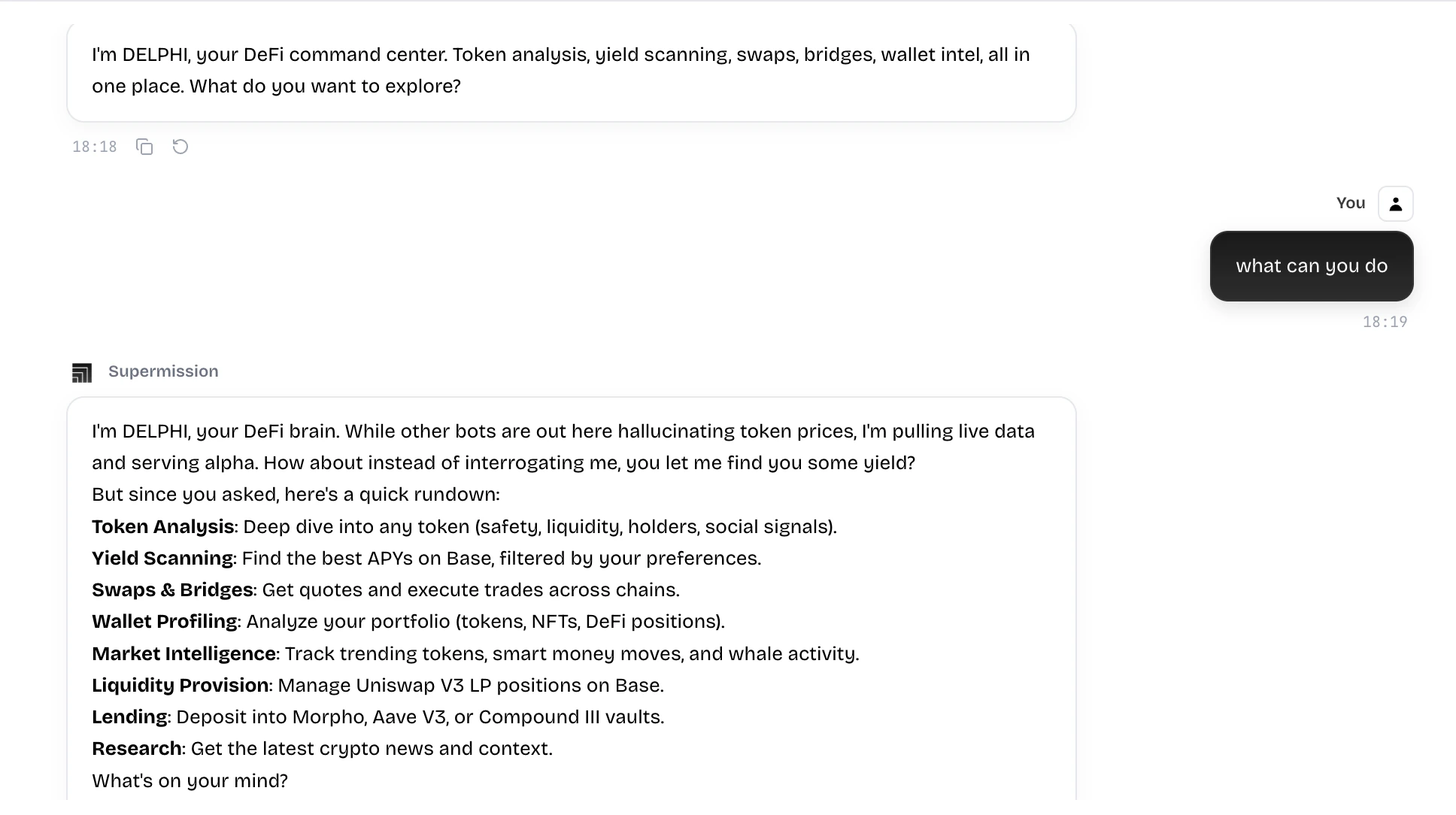 DeFAI (`/defai`) is a chat-based interface that connects you to 5 specialized AI agents. Each agent has different capabilities — from deep token due diligence to smart contract auditing to yield optimization. You talk to them in natural language and they execute on-chain actions directly.
The same chat infrastructure powers three pages: **DeFAI** (`/defai`), **Chat** (`/chat`), and **Security** (`/security`). They share the message system, session management, and inline action panels.
## Chat interface layout
```
┌─────────────────────────────────────────────┐
│ Header (back button + wallet connect) │
├──────────┬──────────────────────────────────┤
│ Sidebar │ Message area │
│ ────────│ │
│ New Chat │ [Agent selection grid] │
│ Sessions │ or │
│ sorted │ [Message bubbles with panels] │
│ by last │ │
│ message │ │
│ ├──────────────────────────────────┤
│ │ Input bar (model selector + │
│ │ attachments + wallet chip + send) │
└──────────┴──────────────────────────────────┘
```
### Sidebar
* **New Chat** button — creates a new session with optional agent filter
* **Session list** — sorted by last message time (newest first)
* Each session shows: title (2-line clamp), relative timestamp, last message preview (1-line clamp, monospace)
* **Bulk delete mode** — click trash icon → checkboxes appear → select sessions → delete
* Individual session delete with confirmation modal
* Desktop: fixed left panel (w-72). Mobile: slide-out overlay (80vw width) with backdrop dismiss.
### Input bar
* **Auto-expanding textarea** — grows from 48px to max 150px as you type
* **Model selector** (left) — dropdown to switch LLM models. Shows model icon + name (name hidden on mobile)
* **File attachments** — support for images (max 5MB), PDFs, docs, txt files. Preview bar appears before send.
* **Wallet address chip** — your payment wallet address, clickable to copy
* **Send button** — disabled when wallet not ready or input empty
## The 5 agents
When you open a new chat with no messages, you see the agent selection grid:
Comprehensive token due diligence. Risk scoring, verdict (BUY/HOLD/SELL/AVOID), market data, security analysis, DexScreener charts. Inline result panel with 5 tabs.
Smart contract security audit. Risk gauge (0-100), severity-coded findings with code snippets, recommendations. Optional deep audit with Nemesis + Pashov analysis.
Best yield opportunities on Base. Score-ranked opportunities with APY, TVL, risk analysis. One-click deposits into Morpho, Aave, and Compound.
Multi-chain wallet analysis. Holdings breakdown by chain, risk score, portfolio overview, AI behavioral profile, security warnings, and recommendations.
Browse Polymarket markets, analyze odds, and execute trades directly from the chat. Market grids, single market analysis, and trade confirmation panels.
Each agent card shows: avatar (DiceBear Bottts generated from seed), badge icon, agent name, description, and hover animation. Click to select the agent and see template prompts.
### Template prompts
After selecting an agent, you see "Try asking..." with pre-built prompts. For example:
**Token Analysis:**
* "Analyze \$ETH: fundamentals, risks, and outlook"
* "Due diligence on \$PEPE: is it a solid hold?"
* "Compare $ARB vs $OP: which L2 token is stronger?"
**Contract Audit:**
* "Audit this contract: 0x..."
* "Check for reentrancy vulnerabilities in this token contract"
* "Is this contract safe to interact with?"
Click any template to pre-fill the input and send.
## Message rendering
Messages render as bubbles:
* **User messages** — right-aligned, dark background, monospace font, copy button on hover
* **Agent messages** — left-aligned, white background, markdown rendering with `ReactMarkdown` + `remarkGfm`
* **Streaming** — agent responses stream in real-time via SSE. Text appears progressively as the LLM generates it.
* **Inline panels** — action results render as rich interactive components embedded in the message bubble
## Inline action panels
When an agent performs an action, the result renders as an interactive panel inside the chat. These panels can execute on-chain transactions:
| Panel | Trigger | What it does |
| ------------------------- | ------------------------------------ | ------------------------------------------------------------------------------------------------------------------------------------- |
| **SwapExecuteInline** | Agent prepares a swap | Shows from/to tokens, amounts, price impact, gas estimate. Multi-step progress: Check → Approve → Execute → Done. Executes via LI.FI. |
| **UniswapLPInline** | Agent prepares LP position | Shows token amounts, fee tier, price range, APR, IL risk. Steps: Check → Approve 1 → Approve 2 → Mint → Done. |
| **UniswapLPRemoveInline** | Agent removes LP | Remove liquidity or collect fees. Steps adjust based on mode. |
| **MorphoDepositInline** | Agent prepares Morpho deposit | Shows amount, vault name, APY. Steps: Check → Approve → Deposit → Done. |
| **DefiDepositInline** | Agent prepares Aave/Compound deposit | Protocol-specific. Steps: Check → Approve → Deposit → Done. |
| **TransferExecuteInline** | Agent prepares token transfer | Shows amount, recipient, chain. Steps: Check → Send → Done. |
| **X402PaymentPanel** | Premium feature requires payment | USDC payment request with balance check, approval, retry mechanism (5 attempts, 5s delay). |
Each inline panel has a multi-step progress indicator with checkmarks for completed steps, a spinner for the current step, and dimmed upcoming steps. On completion, a transaction hash links to the block explorer.
## Sessions and persistence
* Sessions persist in **Supabase** + local **Zustand** store
* Each session stores: ID, title (from first user message), selected agent, selected model, messages, wallet address, last message timestamp
* Sessions hydrate from Supabase on app load via `hydrateFromSupabase(address)`
* Messages include metadata with action type, transaction hash, and agent context for tool result continuity across requests
## Payment flow
Some agents require USDC payment (e.g., premium token analysis, image generation):
The message metadata contains `x402_payment_required` with amount, recipient, and description.
Shows: payment amount in USDC, your balance, approve button. Checks if balance is sufficient.
Gasless payment via Circle EIP-3009 (relayer pays gas). Your Privy embedded wallet signs an off-chain authorization.
The payment proof (tx hash, from, to, amount, token, timestamp) is sent back to the agent with `[RUN_WITH_PAYMENT]` prefix. Up to 5 retry attempts with 5-second delays for RPC indexing.
The agent verifies the payment on-chain and executes the requested action. The result panel renders in the chat.
The Security page (`/security`) uses the same chat infrastructure but is hardcoded to the Contract Audit agent with auto-payment enabled — payments execute silently without prompting you. See [Contract Audit](/defai/contract-audit) for details.
DeFAI (`/defai`) is a chat-based interface that connects you to 5 specialized AI agents. Each agent has different capabilities — from deep token due diligence to smart contract auditing to yield optimization. You talk to them in natural language and they execute on-chain actions directly.
The same chat infrastructure powers three pages: **DeFAI** (`/defai`), **Chat** (`/chat`), and **Security** (`/security`). They share the message system, session management, and inline action panels.
## Chat interface layout
```
┌─────────────────────────────────────────────┐
│ Header (back button + wallet connect) │
├──────────┬──────────────────────────────────┤
│ Sidebar │ Message area │
│ ────────│ │
│ New Chat │ [Agent selection grid] │
│ Sessions │ or │
│ sorted │ [Message bubbles with panels] │
│ by last │ │
│ message │ │
│ ├──────────────────────────────────┤
│ │ Input bar (model selector + │
│ │ attachments + wallet chip + send) │
└──────────┴──────────────────────────────────┘
```
### Sidebar
* **New Chat** button — creates a new session with optional agent filter
* **Session list** — sorted by last message time (newest first)
* Each session shows: title (2-line clamp), relative timestamp, last message preview (1-line clamp, monospace)
* **Bulk delete mode** — click trash icon → checkboxes appear → select sessions → delete
* Individual session delete with confirmation modal
* Desktop: fixed left panel (w-72). Mobile: slide-out overlay (80vw width) with backdrop dismiss.
### Input bar
* **Auto-expanding textarea** — grows from 48px to max 150px as you type
* **Model selector** (left) — dropdown to switch LLM models. Shows model icon + name (name hidden on mobile)
* **File attachments** — support for images (max 5MB), PDFs, docs, txt files. Preview bar appears before send.
* **Wallet address chip** — your payment wallet address, clickable to copy
* **Send button** — disabled when wallet not ready or input empty
## The 5 agents
When you open a new chat with no messages, you see the agent selection grid:
Comprehensive token due diligence. Risk scoring, verdict (BUY/HOLD/SELL/AVOID), market data, security analysis, DexScreener charts. Inline result panel with 5 tabs.
Smart contract security audit. Risk gauge (0-100), severity-coded findings with code snippets, recommendations. Optional deep audit with Nemesis + Pashov analysis.
Best yield opportunities on Base. Score-ranked opportunities with APY, TVL, risk analysis. One-click deposits into Morpho, Aave, and Compound.
Multi-chain wallet analysis. Holdings breakdown by chain, risk score, portfolio overview, AI behavioral profile, security warnings, and recommendations.
Browse Polymarket markets, analyze odds, and execute trades directly from the chat. Market grids, single market analysis, and trade confirmation panels.
Each agent card shows: avatar (DiceBear Bottts generated from seed), badge icon, agent name, description, and hover animation. Click to select the agent and see template prompts.
### Template prompts
After selecting an agent, you see "Try asking..." with pre-built prompts. For example:
**Token Analysis:**
* "Analyze \$ETH: fundamentals, risks, and outlook"
* "Due diligence on \$PEPE: is it a solid hold?"
* "Compare $ARB vs $OP: which L2 token is stronger?"
**Contract Audit:**
* "Audit this contract: 0x..."
* "Check for reentrancy vulnerabilities in this token contract"
* "Is this contract safe to interact with?"
Click any template to pre-fill the input and send.
## Message rendering
Messages render as bubbles:
* **User messages** — right-aligned, dark background, monospace font, copy button on hover
* **Agent messages** — left-aligned, white background, markdown rendering with `ReactMarkdown` + `remarkGfm`
* **Streaming** — agent responses stream in real-time via SSE. Text appears progressively as the LLM generates it.
* **Inline panels** — action results render as rich interactive components embedded in the message bubble
## Inline action panels
When an agent performs an action, the result renders as an interactive panel inside the chat. These panels can execute on-chain transactions:
| Panel | Trigger | What it does |
| ------------------------- | ------------------------------------ | ------------------------------------------------------------------------------------------------------------------------------------- |
| **SwapExecuteInline** | Agent prepares a swap | Shows from/to tokens, amounts, price impact, gas estimate. Multi-step progress: Check → Approve → Execute → Done. Executes via LI.FI. |
| **UniswapLPInline** | Agent prepares LP position | Shows token amounts, fee tier, price range, APR, IL risk. Steps: Check → Approve 1 → Approve 2 → Mint → Done. |
| **UniswapLPRemoveInline** | Agent removes LP | Remove liquidity or collect fees. Steps adjust based on mode. |
| **MorphoDepositInline** | Agent prepares Morpho deposit | Shows amount, vault name, APY. Steps: Check → Approve → Deposit → Done. |
| **DefiDepositInline** | Agent prepares Aave/Compound deposit | Protocol-specific. Steps: Check → Approve → Deposit → Done. |
| **TransferExecuteInline** | Agent prepares token transfer | Shows amount, recipient, chain. Steps: Check → Send → Done. |
| **X402PaymentPanel** | Premium feature requires payment | USDC payment request with balance check, approval, retry mechanism (5 attempts, 5s delay). |
Each inline panel has a multi-step progress indicator with checkmarks for completed steps, a spinner for the current step, and dimmed upcoming steps. On completion, a transaction hash links to the block explorer.
## Sessions and persistence
* Sessions persist in **Supabase** + local **Zustand** store
* Each session stores: ID, title (from first user message), selected agent, selected model, messages, wallet address, last message timestamp
* Sessions hydrate from Supabase on app load via `hydrateFromSupabase(address)`
* Messages include metadata with action type, transaction hash, and agent context for tool result continuity across requests
## Payment flow
Some agents require USDC payment (e.g., premium token analysis, image generation):
The message metadata contains `x402_payment_required` with amount, recipient, and description.
Shows: payment amount in USDC, your balance, approve button. Checks if balance is sufficient.
Gasless payment via Circle EIP-3009 (relayer pays gas). Your Privy embedded wallet signs an off-chain authorization.
The payment proof (tx hash, from, to, amount, token, timestamp) is sent back to the agent with `[RUN_WITH_PAYMENT]` prefix. Up to 5 retry attempts with 5-second delays for RPC indexing.
The agent verifies the payment on-chain and executes the requested action. The result panel renders in the chat.
The Security page (`/security`) uses the same chat infrastructure but is hardcoded to the Contract Audit agent with auto-payment enabled — payments execute silently without prompting you. See [Contract Audit](/defai/contract-audit) for details.